
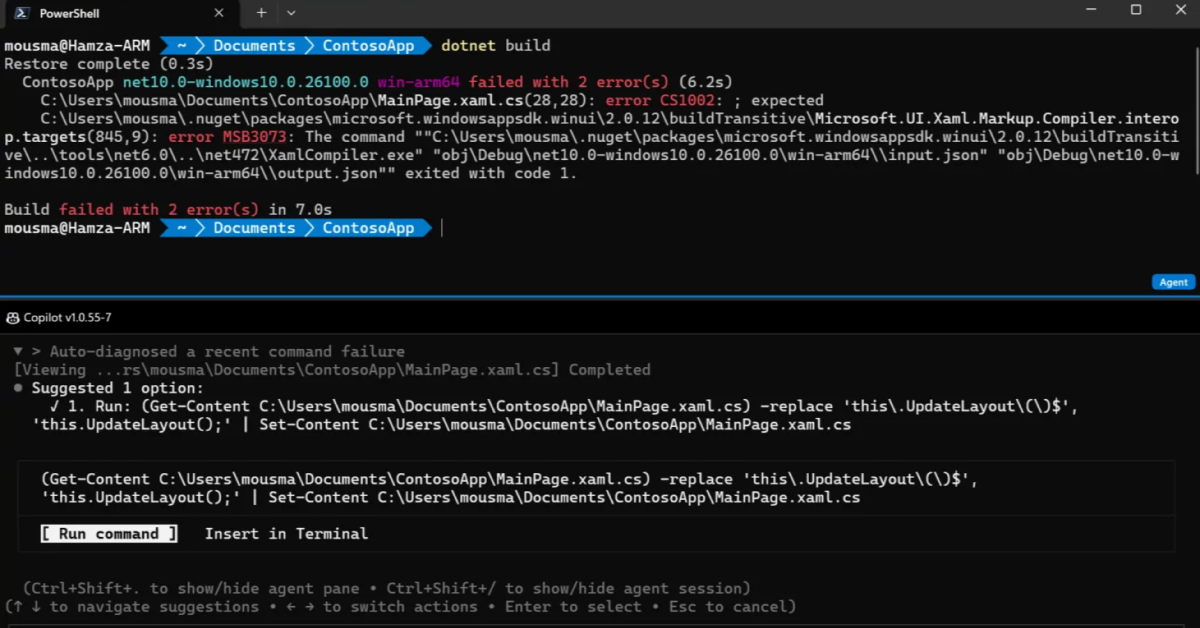
Microsoft has announced Intelligent Terminal 0.1, an experimental open-source fork of Windows Terminal that brings AI agents directly into the command line experience. And honestly, this feels like one of the more interesting AI ideas the company has shown developers in a while.
Rather than treating AI as some separate chatbot floating in a browser tab, Intelligent Terminal tries to turn the shell itself into an AI workspace. The app adds a dedicated agent pane, automatic error detection, session management, and deep context awareness right alongside your terminal output.
SEE ALSO: Surface RTX Spark Dev Box is the coolest Microsoft hardware in years
If you have ever copied a failed PowerShell command into Google, opened six Stack Overflow tabs, and then pasted commands back into your shell hoping something works, Microsoft clearly thinks this product is for you.
The biggest feature here is probably the agent pane. It sits docked beside your shell and maintains awareness of your terminal output. Microsoft says GitHub Copilot CLI is the default AI experience, but developers can also configure other ACP-compatible agents, including local AI tools.
That openness matters. Developers tend to hate being forced into one ecosystem, especially when AI tools are evolving so quickly.
The workflow sounds pretty slick too. You can ask the AI to explain an error, suggest a fix, or continue troubleshooting while maintaining conversational context. Intelligent Terminal can even launch longer-running agent tasks in separate tabs so your active shell remains usable.
Automatic error detection could end up being the killer feature for many folks. When a command fails, the terminal detects the issue and loads the context directly into the agent pane. Developers can configure the software to either suggest fixes automatically or simply explain what went wrong.
There is also an agent management panel for tracking active and past AI sessions across multiple tabs. That might sound small, but when juggling several terminals and AI workflows simultaneously, having a central dashboard could genuinely help keep things organized.
The Command Palette integration is another smart touch. Typing a prompt with a question mark can automatically inject terminal context into an AI request while launching the task in the background. It is easy to see Microsoft’s larger vision here. The company wants AI agents embedded everywhere developers work, including the command line itself.
At the same time, I suspect reactions from developers will be mixed. Some folks will absolutely love this. Others will see it as AI clutter invading one of the few remaining distraction-free computing environments.
To Microsoft’s credit, Intelligent Terminal ships as a completely separate application rather than replacing Windows Terminal. If you do not want AI living inside your shell, nothing changes for you.
And frankly, that is probably the right approach.
Developers can install Intelligent Terminal now through the Microsoft Store or with the following WinGet command:
winget install Microsoft.IntelligentTerminal
The project is also available on GitHub for anybody interested in contributing, filing bugs, or simply seeing how Microsoft is wiring AI agents into the terminal experience
Support independent tech journalism
NERDS.xyz is independently owned and operated. If you enjoy my coverage of Linux, AI, hardware, cybersecurity, and tech culture, consider supporting the site on Ko-fi.
Support NERDS.xyz