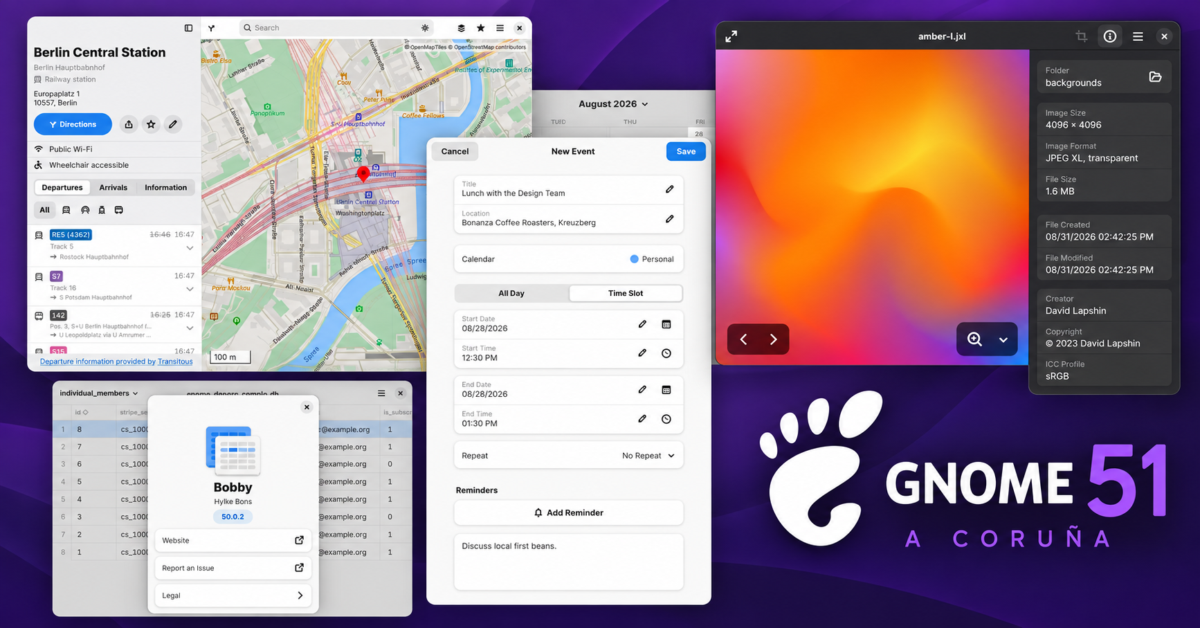
GNOME 51 is officially here, and this release gives Linux users a surprisingly long list of practical improvements. Codenamed “A Coruña” after the Spanish city that hosted GUADEC 2026, the latest version arrives after six months of development.
Performance and smarter hardware behavior
Performance gets attention immediately. GNOME says Mutter now uses reworked frame scheduling and screen delivery that should produce smoother animations, particularly when the system is under load. Screen recording should also be faster thanks to less buffer copying and other redundant work.
GNOME 51 can now remember monitor brightness across reboots and HDR changes. The project has also removed support for legacy NVIDIA driver interfaces, relying exclusively on modern graphics interfaces going forward. Anyone running current NVIDIA drivers should benefit from the simpler approach, but it is another reminder that old proprietary graphics support eventually gets left behind.
Settings picks up several useful additions. Devices with accelerometers can automatically rotate between portrait and landscape orientations, complete with an orientation lock. This should be particularly useful on convertible laptops and tablets. GNOME can also automatically disable a laptop touchpad when a mouse is connected, which is one of those small options that probably should have existed already.
Offline Maps and better core apps
The biggest surprise may be Maps. GNOME Maps can finally download regions for offline use, allowing you to navigate without an internet connection. That could make the app far more useful while traveling or anywhere cellular coverage becomes unreliable.
Public transit information gets better too. Maps can show live departures and arrivals where supported, along with delays, platform or stop information, and walking times between different parts of a journey. Offline maps alone would have made this a notable update for the app, but the transit additions make Maps considerably more capable.
Files gets a collection of smaller improvements. A badge now displays how many files you are dragging at once, copied files are automatically selected, and right-clicking empty space no longer wipes out the current selection. GNOME also moved several slow operations out of the way of the interface, which should make Files feel more responsive when dealing with large or slower folders.
GNOME Web gets secure password generation using the pwquality library, improvements to its password manager, and a cleaner address bar. There is also a new Ctrl+Shift+C shortcut for copying the current page URL without first opening the address bar.
Software will now warn users before installing applications that are no longer maintained. Flatpak permission information has been expanded as well, giving users a better idea of what an application can access before installation. Cached application data and optimized icon loading should help Software start faster.
Calendar received substantial work under the hood. GNOME says Month view should scroll and redraw more smoothly, while large calendars should open and browse faster. Event locations can now open directly in Maps, and Microsoft Teams links receive better support in the event editor.
Visual signatures and accessibility
Papers, GNOME’s document viewer, gains a particularly handy feature: visual signatures. Users can draw a signature with a mouse or touchscreen or import an image of a handwritten signature. Papers can automatically remove the image background before placing the signature into a document. GNOME correctly points out that these are visual signatures rather than cryptographic digital signatures, so they do not prove a document’s authenticity.
Accessibility also gets meaningful attention. Reduced Motion is respected across more of the desktop, screenshot regions can be adjusted entirely with the keyboard, and users can disable the focus ring timeout. Screen reader behavior has been cleaned up in areas including the app dock, search results, and application grid.
Even the humble file previewer gets rebuilt. Sushi now uses GTK 4 and libadwaita, bringing dark mode support and a design that better matches the rest of modern GNOME. Loupe, meanwhile, can display additional image metadata, including creator information, camera equipment, software, and embedded color profiles.
There are plenty of other changes scattered throughout GNOME 51, including scalable SVG cursors, improved fingerprint enrollment, additional remote desktop capabilities, and the removal of obsolete WEP wireless security support.
A practical upgrade
None of these additions individually reinvents the Linux desktop, and that is probably a good thing. GNOME 51 feels focused on fixing annoyances, improving performance, and making existing applications more capable. Offline Maps, better display behavior, faster Files and Calendar apps, visual document signatures, and expanded accessibility options are features people can actually use.
GNOME 51 should begin appearing in major Linux distributions over the coming weeks. For GNOME users, this looks less like an exercise in changing things for the sake of change and more like an update aimed at making the desktop better at doing its job.
Support independent tech journalism
NERDS.xyz is independently owned and operated. If you enjoy my coverage of Linux, AI, hardware, cybersecurity, and tech culture, consider supporting the site on Ko-fi.
Support NERDS.xyz