Giving an AI agent access to your passwords sounds like an absolutely terrible idea. When I first heard about 1Password for Claude, my immediate reaction was that this had crossed a line that should probably remain uncrossed.
After looking more closely at how it works, however, the idea is not quite as reckless as it sounds. In fact, 1Password has built several thoughtful protections around the feature. That does not mean users should connect Claude to every important account they have, but the credential itself appears to be handled more carefully than the headline might suggest.
1Password for Claude allows Anthropic’s AI agent to sign in to websites on a user’s behalf. Claude can then perform browser-based tasks such as checking an order, managing an account, or completing a purchase.
The important distinction is that Claude never receives the actual password.
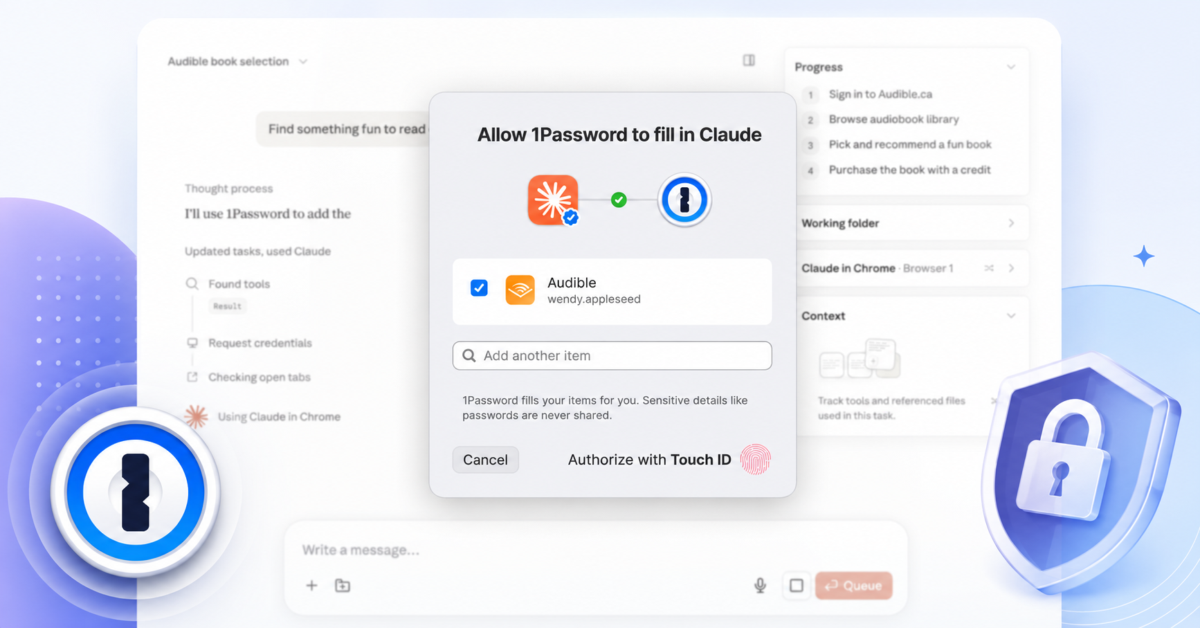
When Claude reaches a website that requires authentication, it sends a request to 1Password. The user sees which saved login Claude wants to use and can approve it, select another login, or deny the request. Approval requires authentication through 1Password, such as Touch ID or the user’s account password.
Once approved, the 1Password browser extension fills the username, password, and supported one-time passcode directly into the website. According to 1Password, this happens through a secure channel outside Claude’s view. The password and one-time code never enter Claude’s context, memory, or Anthropic’s systems. Claude only knows which login was used.
That is considerably safer than copying a password into a Claude conversation or allowing the model to read credentials from a document.
1Password also introduces something called Agentic Mode. It activates automatically when Claude takes control of the browser and locks down the 1Password extension. Claude can only use credentials that the user specifically approved for the current task. It cannot browse around the vault, trigger normal autofill suggestions, or reach other saved items through the browser extension.
This helps address one of the most alarming possibilities. An AI agent controlling a browser with an unlocked password manager could otherwise attempt to interact with that extension or access unrelated accounts.
The integration currently works on Mac and requires recent versions of the 1Password desktop app and browser extension, along with the Claude desktop app and browser extension. It supports usernames, passwords, and one-time passwords stored in 1Password Login items. Passkeys are not supported yet, and websites using options such as Sign in with Google may not work properly.
All of this makes the system safer than I initially expected. Unfortunately, it does not eliminate the largest risk.
Claude may never see your password, but it can still enter your authenticated account.
Once signed in, an AI agent could potentially view private information, change settings, submit forms, place orders, send messages, or perform other actions available to the account holder. Protecting the password does not automatically protect everything behind it.
Consider an online retailer. Claude might not know your password, but after signing in it could see your order history, address, subscriptions, saved payment options, and other account information. The same problem becomes far more serious with email, social media, web hosting, cloud administration, financial services, or a business dashboard.
There is also the persistent threat of prompt injection. A malicious or compromised webpage could contain instructions intended to manipulate the agent. Claude could also misunderstand what the user wants, click the wrong button, choose the wrong account, or submit something before the user realizes what happened.
Biometric approval is helpful, but users will need to pay close attention to every request. People have become accustomed to approving Face ID and Touch ID prompts quickly. An approval screen showing that Claude wants an Amazon login does not necessarily communicate every action Claude may take once it gets inside the account.
That is why I would start with low-risk and preferably read-only tasks.
Asking Claude to check the delivery status of an order seems reasonably sensible. Allowing it to review an Audible wishlist and redeem an expiring credit could also be acceptable, assuming the user checks the requested login and understands the possible purchase.
I would be far more hesitant to grant access to Gmail, a bank, Stripe, WordPress, a hosting control panel, social media, or anything that can publish content, transfer money, delete data, change passwords, or modify security settings.
Users should also avoid granting Claude access through an administrator account when a restricted account is available. Businesses considering the feature should apply the same least-privilege rules they would use for an employee or service account. An AI agent should receive only the access required for the specific task.
1Password deserves credit for recognizing that AI agents will eventually need a safer authentication system than simply being handed a password. Per-task approval, biometric authorization, direct credential injection, and automatic vault lockdown are meaningful protections.
The company has solved the credential exposure problem more carefully than I expected.
It has not solved the broader problem of whether an AI agent should be trusted with everything available after login.
1Password for Claude may be useful, and it appears safer than its unsettling premise suggests. Users should still approach it cautiously, begin with accounts where mistakes have limited consequences, and carefully inspect every request before approving it.
The password may remain secret, but the authority behind that password is still being handed to Claude.
Support independent tech journalism
NERDS.xyz is independently owned and operated. If you enjoy my coverage of Linux, AI, hardware, cybersecurity, and tech culture, consider supporting the site on Ko-fi.
Support NERDS.xyz