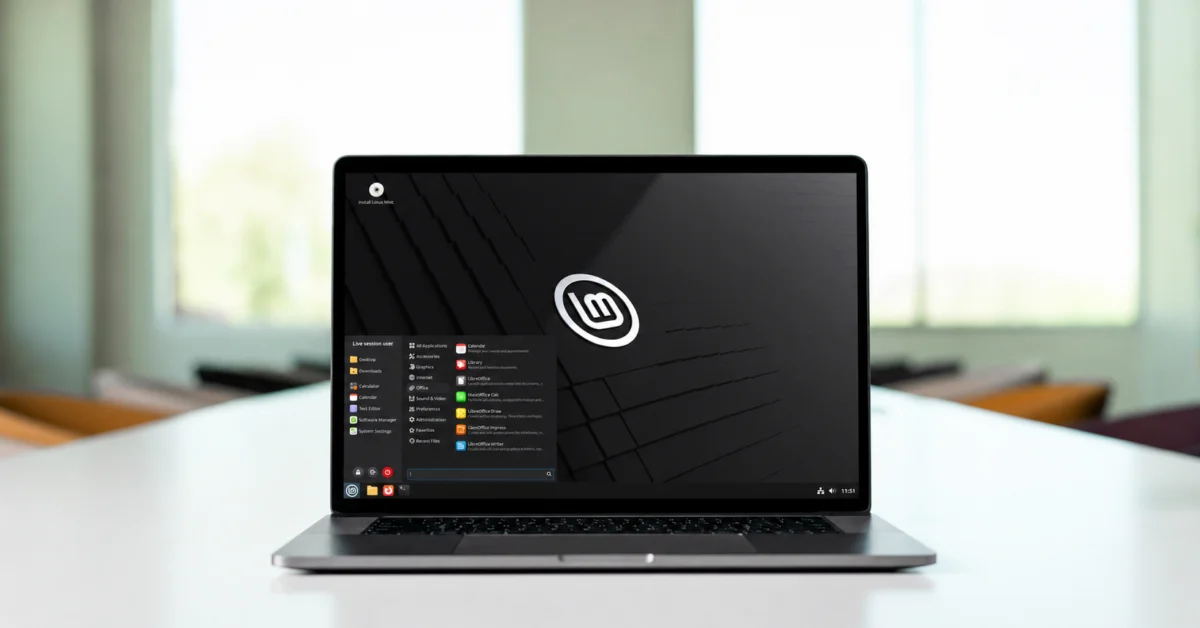
Well, Linux Mint fans, Christmas has apparently come a little early this year. The Linux Mint team today released the beta of Linux Mint 27 “Adrien,” and this is shaping up to be one of the most exciting releases of the popular Linux distribution in years.
Based on Ubuntu 26.04 LTS and powered by the Linux 7.0 kernel, Linux Mint 27 will receive support until April 2031. Rather than simply updating packages and calling it a day, however, the developers have introduced several entirely new applications, modernized system administration, and delivered some long-awaited desktop improvements.
Cinnamon finally embraces Wayland
Arguably the biggest news is Cinnamon 6.8, which now offers full Wayland support. This includes 3D acceleration, HiDPI displays, fractional scaling, keyboard layouts, input methods, and both touchpad and touchscreen gestures.
Cinnamon has historically been rather conservative when it comes to adopting newer technologies, but that is part of its appeal. While other desktop environments have sometimes moved faster than their users would have liked, Cinnamon has generally prioritized familiarity and stability.
The screensaver and lock screen have been rewritten from scratch and are now integrated directly into Cinnamon, working under both Wayland and X11. One-to-one gestures have also been introduced, meaning desktop animations actually follow your fingers as you swipe between workspaces.
Nemo, the Cinnamon file manager, gets a new preview pane that supports images, audio, and video files. Folder navigation is faster, interactive search now filters visible files as you type, and the file manager can restore tabs from its previous window.
Another particularly welcome improvement involves removable storage. Nemo now accounts for cached data when displaying file transfer progress, so reaching 100 percent actually indicates the data has been written to the drive. Anyone who has ever wondered why a USB flash drive cannot be safely removed after an apparently completed transfer should appreciate this.
Linux Mint gets a bunch of new applications
The developers have apparently been quite busy building software of their own. Linux Mint 27 introduces several applications that could make installing third-party alternatives unnecessary for some users.
Clockenstein, which might be my favorite software name of 2026, is a new calendar application that supports local calendars, Google Calendar, and CalDAV services such as Nextcloud. It handles synchronization and event reminders in the background, even when the application itself is closed.
An accompanying application called Clocks offers Android-inspired alarm management, including recurring alarms and customizable sounds. Both applications integrate with Clockenstein’s background services.
Velocitty is a new terminal application that offers customizable color palettes, detachable tabs, bookmarked sessions, and support for different shells. Tabs can even change colors to indicate superuser activity, remote connections, or running processes.
Superlight is a new system monitor that goes well beyond displaying CPU and memory usage. It can track GPU activity, temperatures, fan speeds, battery behavior, network activity, and disk usage. It can even show how much storage individual Steam games and Flatpak applications are consuming.
There is also Unfold, a lightweight archive manager powered by 7-Zip, and Xepub, an EPUB ebook reader with bookmarks, annotations, dictionary lookups, and customizable fonts. The existing Thingy document library has been redesigned, too.
Hibernation makes a comeback
As someone who appreciates Linux distributions that make everyday computing easier, I am particularly happy to see Linux Mint bringing back accessible hibernation settings.
A new Sleep Modes section in System Administration helps users configure hibernation without having to figure out the necessary swap configuration themselves. Hybrid Sleep and Suspend-then-Hibernate are also available.
This is especially useful for laptop owners who close the lid expecting to return to their computers later, only to discover a completely drained battery. Hibernation saves the session to storage, allowing the computer to power down without losing the user’s work.
Kernel management has also been moved out of Update Manager and into System Administration. Users can select which kernel series to track, automatically remove older kernels, and protect individual kernels from deletion.
Other improvements include home directory encryption when creating new user accounts, system-wide environment variable management, improved fingerprint authentication, and the ability to temporarily pause automated Timeshift snapshots.
Linux Mint is also replacing Ubuntu’s Ubiquity installer with the Live Installer already used by LMDE. The developers describe the replacement as faster, more stable, and easier to maintain.
Should you install Linux Mint 27 beta?
Linux Mint 27 continues to have surprisingly modest hardware requirements. The distribution requires just 2GB of RAM, 20GB of storage, and a display resolution of 1024×768. The developers recommend 4GB of RAM and 100GB of storage for a more comfortable experience.
Keep in mind that this is beta software, and the Linux Mint team specifically warns that critical bugs may be present. Those interested in helping the developers can report reproducible problems through the project’s GitHub repository.
Users will eventually be able to upgrade from the beta to the stable release. An upgrade path from Linux Mint 22.3 will also be available, with instructions to follow once Adrien is officially released.
What I find most appealing about Linux Mint 27 is that so many of its improvements address actual desktop computing needs. Better file management, reliable calendar synchronization, easier hibernation, and improved hardware support may not generate the same attention as shoehorning artificial intelligence into an operating system, but they can make a computer genuinely more enjoyable to use.
Perhaps Microsoft could learn a thing or two from the Linux Mint developers. Sometimes people just want a damn good operating system.
Support independent tech journalism
NERDS.xyz is independently owned and operated. If you enjoy my coverage of Linux, AI, hardware, cybersecurity, and tech culture, consider supporting the site on Ko-fi.
Support NERDS.xyz