
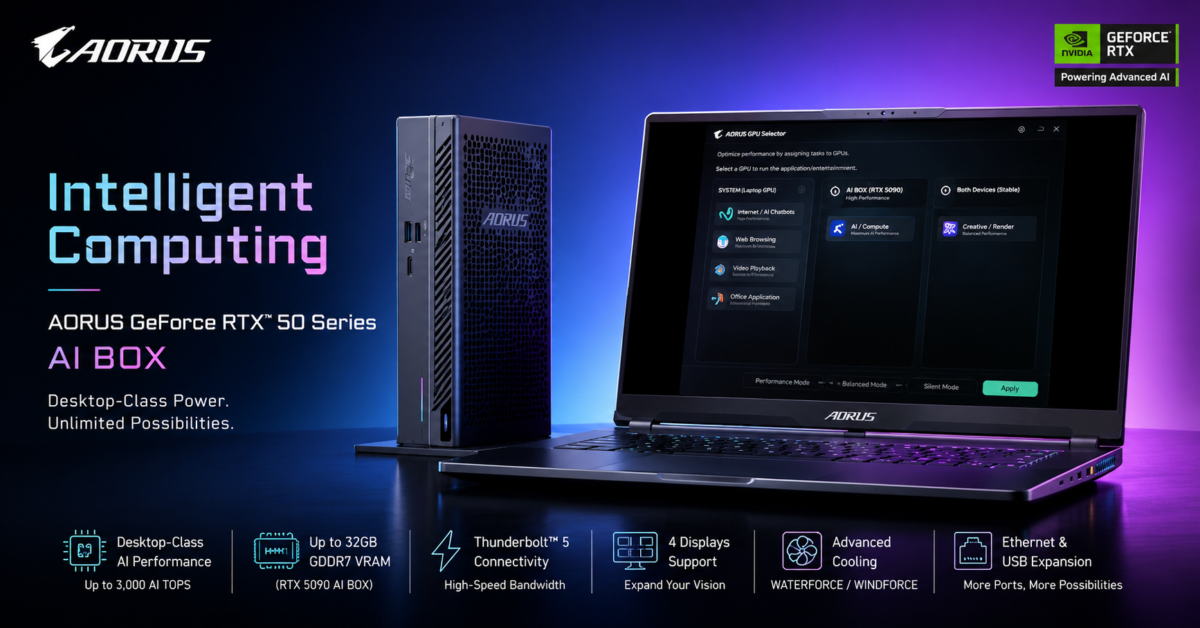
If you have ever wished your thin-and-light laptop had the muscle of a high-end desktop, GIGABYTE thinks it has the answer. The company has unveiled the AORUS GeForce RTX 50 Series AI BOX lineup, bringing external NVIDIA Blackwell-powered graphics to ultrabooks and other portable computers.
The new family consists of two models. At the top sits the AORUS GeForce RTX 5090 AI BOX, while the more affordable option is the AORUS GeForce RTX 5060 Ti AI BOX. Both connect over Thunderbolt 5 and are designed to dramatically boost gaming, content creation, and AI workloads without requiring users to abandon their existing laptops.
The flagship RTX 5090 AI BOX is especially ambitious. GIGABYTE says it delivers more than 3,000 AI TOPS of FP4 performance and includes 32GB of VRAM. That makes it suitable for running large language models, generative AI applications, inference workloads, and other demanding tasks that would normally overwhelm an ultrabook’s integrated graphics.
Meanwhile, the RTX 5060 Ti AI BOX aims for a broader audience. Equipped with 16GB of VRAM, it targets users who want smoother 1080p and 1440p gaming, local AI image generation, 3D rendering, and accelerated creative applications without investing in a desktop system.
One interesting feature is GIGABYTE’s new GPU Selector software. Rather than forcing users to manually manage graphics resources, the software lets workloads be assigned between a laptop’s built-in GPU and the external AI BOX. In theory, that should make multi-GPU setups easier to manage while improving performance and efficiency.
Cooling is another area where the company is trying to differentiate these products. The RTX 5090 AI BOX uses a WATERFORCE all-in-one liquid cooling solution with a 240mm radiator and dual 120mm fans. The RTX 5060 Ti AI BOX relies on the company’s WINDFORCE cooling system, featuring Hawk Fan technology and server-grade thermal materials.
Beyond graphics and AI acceleration, both models function as docking stations. They offer Ethernet networking, USB expansion, and support for up to four displays. That means a single Thunderbolt 5 connection can potentially transform a lightweight laptop into a workstation-style setup.
I actually like this idea quite a bit. Many people prefer carrying lightweight laptops but occasionally need serious GPU power. Rather than buying and maintaining a separate desktop, an external GPU enclosure with modern connectivity can be a compelling middle ground. The biggest question, as always, will be pricing. External GPU solutions have historically been expensive, and the RTX 5090 certainly won’t help bring costs down.
Still, as AI workloads continue moving onto local hardware, products like the AORUS AI BOX could become increasingly attractive for users who want desktop-class performance without giving up portability.
Support independent tech journalism
NERDS.xyz is independently owned and operated. If you enjoy my coverage of Linux, AI, hardware, cybersecurity, and tech culture, consider supporting the site on Ko-fi.
Support NERDS.xyz