
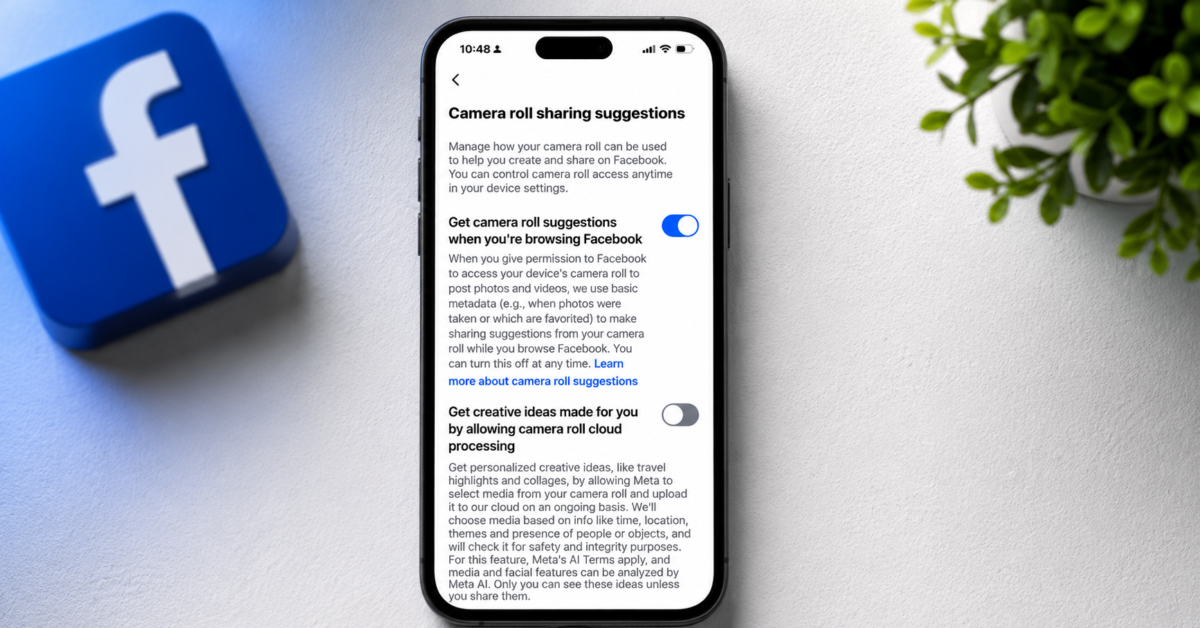
I saw a tweet this weekend that made me check Facebook’s settings on my iPhone, and I really didn’t like what I found.
Buried inside the app is a feature called “Camera roll sharing suggestions.” According to Meta, the feature uses metadata from your photos and videos to generate suggestions while you browse Facebook.
Sounds harmless, right?
That means Facebook can inspect information tied to your camera roll. Meta says this can include things like when photos were taken, which images are favorited, and even the type of photo, such as panoramas, selfies, and time lapses.
And then there’s the second setting which really scares me.
Below the basic suggestion toggle is something called “camera roll cloud processing.” Meta says enabling the feature allows it to “select media from your camera roll and upload it to our cloud on an ongoing basis.”
That’s Meta’s wording, not mine.
The company says uploaded media may be analyzed for things like time, location, themes, people, objects, and even facial features through Meta AI. In exchange, users get AI generated collages, travel highlights, and other “creative ideas.”
I don’t know about you folks, but I don’t need Facebook rummaging through my personal photo library so AI can make me a slideshow of my son eating chicken nuggets.
To be fair, Meta is disclosing all of this. The company is not secretly hiding the feature. But there’s a huge difference between technically disclosing something and making users truly aware of it.
Most people probably have no clue these settings even exist.
A lot of users likely tapped “Allow Photos Access” years ago because they wanted to upload family pictures. They probably did not expect that permission to eventually evolve into AI powered camera roll analysis.
Thankfully, you can disable this stuff pretty easily.
Inside the Facebook app, go to:
Menu → Settings & privacy → Settings → Camera roll sharing suggestions
Then disable:
“Get camera roll suggestions when you’re browsing Facebook”
You should also make sure this remains off:
“Get creative ideas made for you by allowing camera roll cloud processing”
On iPhone, I’d also recommend checking:
Settings → Apps → Facebook → Photos
From there, consider switching Facebook to “Selected Photos” instead of “Full Access.” If you barely upload photos to Facebook anymore, you may even want to disable photo access completely.
Personally, I think social media companies have become far too comfortable asking for broad access to deeply personal data while pretending it’s all just harmless convenience. Ten years ago, the idea of Facebook continuously analyzing your camera roll for AI generated suggestions would have sounded dystopian.
Now it’s buried in a settings menu most people will never see.
Support independent tech journalism
NERDS.xyz is independently owned and operated. If you enjoy my coverage of Linux, AI, hardware, cybersecurity, and tech culture, consider supporting the site on Ko-fi.
Support NERDS.xyz