

Lately, there’s been a growing unease around software, and not just among security folks. With governments and big organizations starting to rethink their reliance on foreign-controlled tech, a pretty uncomfortable truth is getting more attention. If a vendor controls updates, it can push whatever code it wants onto your machine, whenever it wants, with full privileges. Most people know this on some level, but it’s easier not to dwell on it.
That backdrop is what led the developer of Little Snitch to take a serious look at Linux. The logic is simple enough. Linux isn’t owned by one company or one country. You have choices. You can decide who you trust, or even build your own stack if you have the resources.
So he installed Linux on some older hardware and tried living with it. The basics were all there. Browser, email, text editor, development tools, Git, Signal, Wireshark. Pretty standard setup. There are still limits, like not being able to do Mac development, but none of that was surprising.
What did stand out was how exposed things felt without Little Snitch.
If you’ve used it on macOS, you know the feeling. You can see exactly what’s connecting out, which app is responsible, and shut it down instantly if you don’t like it. On Linux, there are tools, sure. OpenSnitch exists, plus a bunch of command line utilities and server-focused solutions. But none of them really hit that same sweet spot of clarity and ease. You don’t get that simple “this app is talking to that server, allow or deny?” experience in one clean click.
So instead of settling, he built it.
The Linux version uses eBPF to hook into network activity at the kernel level. That’s a big deal because it avoids the old mess of kernel extensions and keeps things fast and portable. The core logic is written in Rust, and the interface is actually a web app. That might sound odd for a privacy tool, but it ends up being pretty practical. You can monitor a remote Linux server from another device, even a Mac, without jumping through hoops.
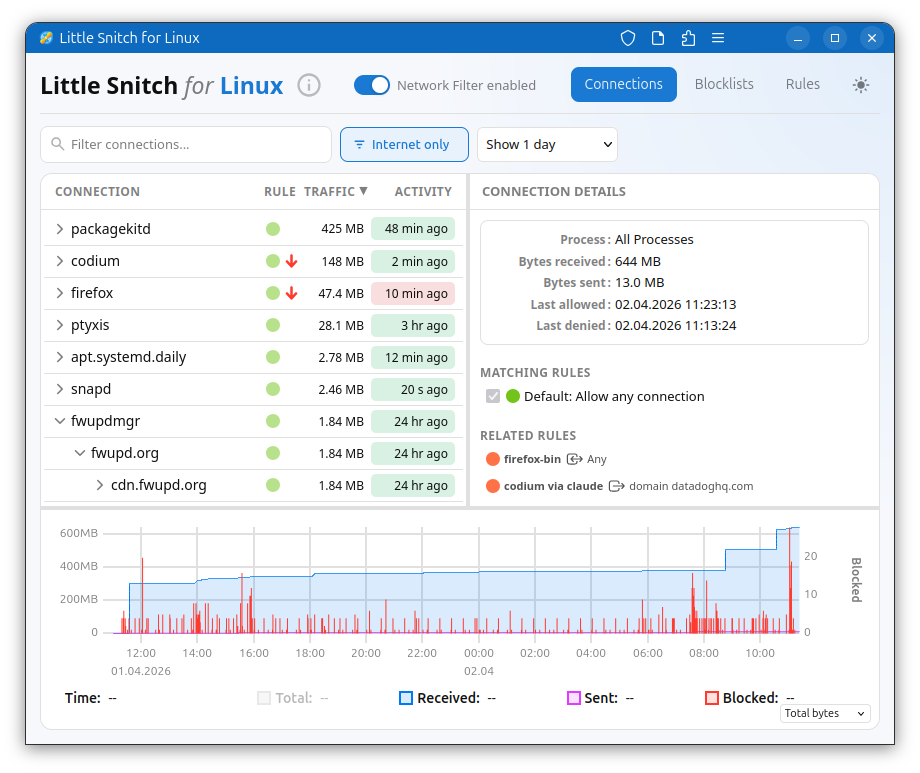
One of the more interesting observations came during testing. On macOS, network activity shows up almost immediately after boot. Within seconds, something is talking to something. On Linux, it can take a while. Sometimes a full minute goes by before you see the first outbound connection.
Using Ubuntu as a baseline, the system ended up with just nine processes making internet connections over the course of a week. On macOS, that number was reportedly over one hundred. That’s not a small difference.
Of course, Linux isn’t magically silent. Ubuntu still phones home for updates and metrics unless you turn that off. And once you start installing apps, things look familiar again.
Take Firefox. Launch it and don’t even browse, and it’s already reaching out to telemetry and ad-related endpoints. You can disable a lot of that in settings, but not everything goes quiet. The advice here is pretty straightforward. Let your apps run, watch what they do, and then decide what you’re comfortable with.
Then there are surprises. LibreOffice, for example, launched without making any network connections at all. In 2026, that almost feels unusual.
The Linux version of Little Snitch is still early. It sits somewhere between the lightweight Mac version and the full-featured one. It works, it’s useful, but it doesn’t have the same level of polish yet. That said, the foundation is there.
Parts of it are open source, including the eBPF kernel component and the user interface. The backend, which handles rules and connection analysis, stays closed for now. That’s where a lot of the long-term experience behind Little Snitch lives, and the developer isn’t ready to open that up.
There’s also an important distinction. This isn’t being positioned as a hardcore security tool. Because of how eBPF works, there are limits. A determined piece of software could potentially get around it. The goal here isn’t bulletproof defense. It’s visibility and control over normal applications that are doing more than you might expect.
Compatibility currently targets newer kernels, with development happening on Ubuntu 25.10 and kernel 6.17, but there’s hope it can be pushed further back with some work.
At the end of the day, this feels less about replacing macOS and more about giving Linux users something they’ve been missing. If you care about what your machine is doing behind your back, and more people clearly do lately, having that level of visibility might be reason enough to give it a shot.
You can download it here.
A connection monitor can reveal unexpected traffic, but it cannot determine intent by itself. Users still need to understand which destinations belong to updates, telemetry, advertising, or core application functions.
Support independent tech journalism
NERDS.xyz is independently owned and operated. If you enjoy my coverage of Linux, AI, hardware, cybersecurity, and tech culture, consider supporting the site on Ko-fi.
Support NERDS.xyz