
Opera has never been afraid to try weird ideas, folks.
Look, sometimes those experiments stick, sometimes they don’t, but one thing I have always appreciated about the browser maker is that it keeps trying to innovate instead of simply copying what everyone else is doing. Whether it is built-in VPN functionality, AI features, or alternative interface ideas, Opera has a habit of shipping features that make you stop and say, “Huh, that’s actually pretty clever.”
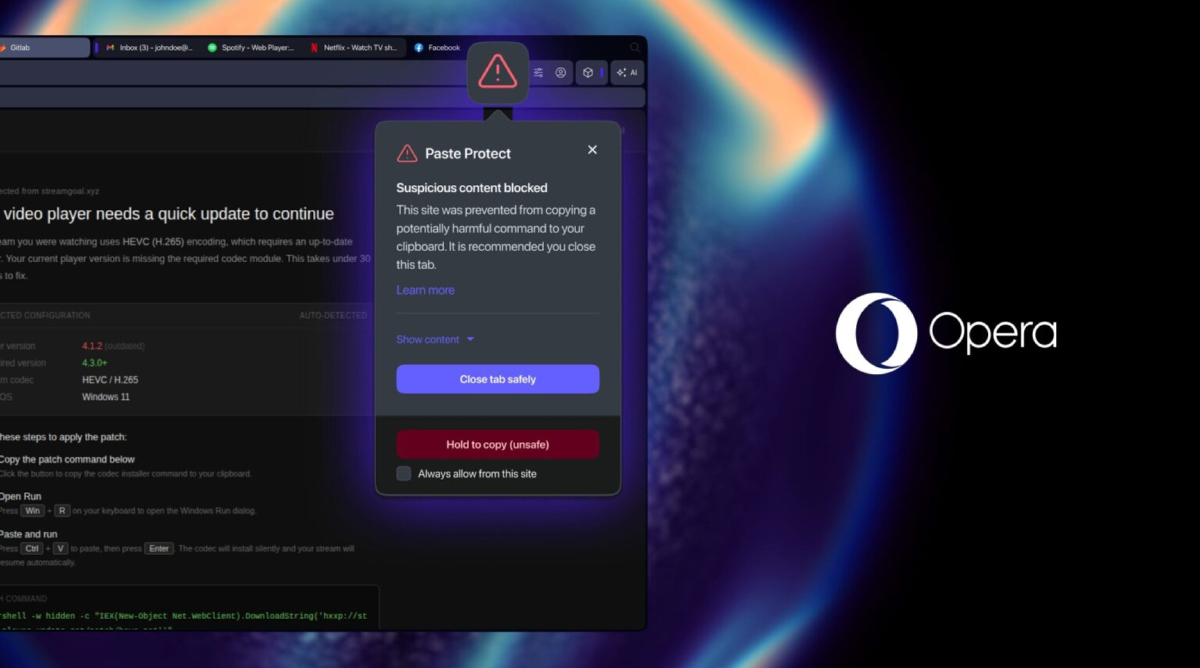
Its latest feature definitely falls into that category. You see, the company has announced Paste Protect, a new security feature designed to stop clipboard attacks before users accidentally infect their own computers. It is launching first in Opera One’s Early Bird release, and Opera says it is the first major browser to build this kind of protection directly into the browser itself.
The feature targets a growing scam known as ClickFix.
If you have spent any time online recently, you may have encountered a fake CAPTCHA or bogus verification screen telling you to press Win+R, paste some text, and click OK to prove that you are human or fix a supposed issue with your browser. What victims do not realize is that the website has already placed a malicious command onto their clipboard and is tricking them into running it themselves.
Once executed, that command could download malware, steal credentials, install remote access software, or otherwise compromise the machine.
Paste Protect is designed to stop that chain of events before it starts.
Whenever a website attempts to place potentially dangerous content on the clipboard, Opera analyzes the copied data for suspicious commands and known attack patterns. If something looks malicious, the browser blocks the copy operation entirely and displays a warning to the user.
A red warning icon appears in the address bar along with a popup explaining that potentially harmful content was blocked and recommending that the tab be closed.
The new feature builds on Opera’s existing clipboard security technology introduced back in 2021. That earlier protection focused on clipboard hijacking attacks where malware silently replaces copied information such as cryptocurrency wallet addresses or bank account numbers with attacker controlled alternatives.
Paste Protect adds what Opera calls Injection Protection, which specifically targets ClickFix style attacks and malicious code injection attempts.
Interestingly, Opera says the protection works across Windows, macOS, and Linux using operating system specific detection methods. Advanced users can still override the warning or whitelist trusted websites if they regularly copy scripts or commands from sources such as GitHub.
The feature is enabled by default and can be managed through the browser’s Privacy and Security settings.
No security feature is perfect, of course, and users should still be extremely cautious anytime a website asks them to open a terminal or the Windows Run dialog and paste commands they do not understand.
Still, I have to give Opera credit here. This feels like exactly the kind of practical security feature browsers should be building in natively instead of leaving users to hunt down third-party extensions. If clipboard attacks continue to grow, I would not be surprised to see competing browsers eventually introduce something similar.
Support independent tech journalism
NERDS.xyz is independently owned and operated. If you enjoy my coverage of Linux, AI, hardware, cybersecurity, and tech culture, consider supporting the site on Ko-fi.
Support NERDS.xyz