
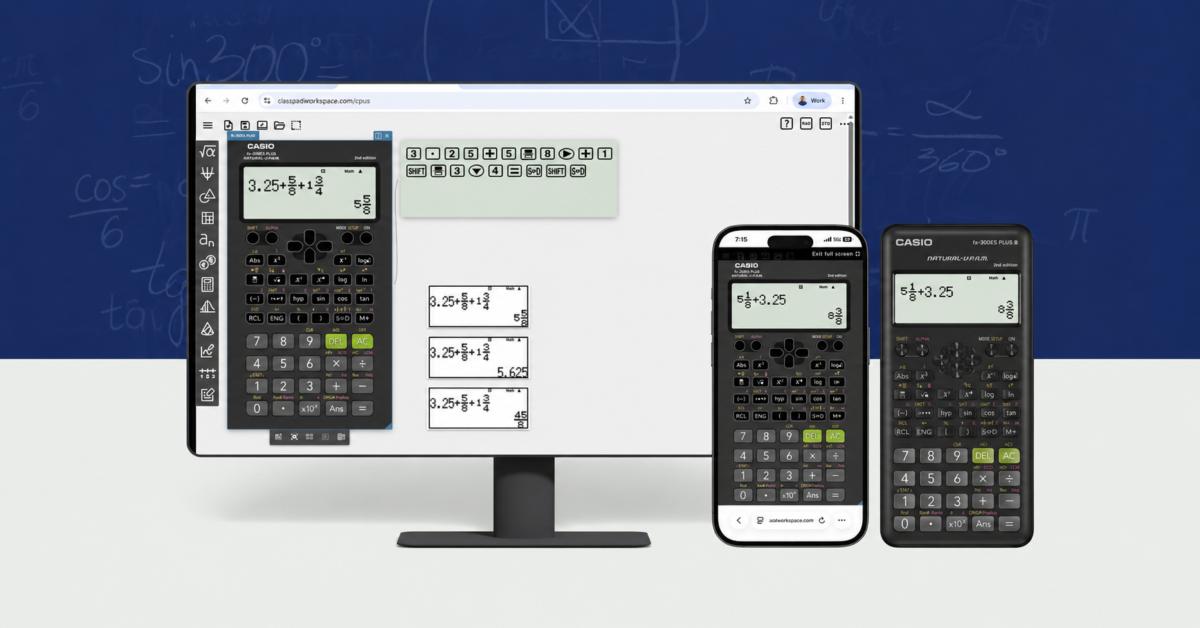
Casio has launched a free browser-based version of its fx-300ES PLUS scientific calculator, giving students and teachers access to the familiar classroom tool without buying any hardware.
The fx-300ES PLUS Online Emulator is available through ClassPad.net and works on computers, Chromebooks, tablets, and other devices with a modern web browser. Casio says there is no subscription, app download, or purchase required.
Users must sign in with a Google, Google Classroom, Microsoft, or Clever account. Once logged in, they receive access to a functioning digital recreation of the physical fx-300ES PLUS calculator.
“The 300ES PLUS has been a staple in math and science classrooms for years because it’s reliable and easy to use,” said Marko Wityk, senior general manager of EdTech at Casio America. “This emulator takes that same experience and makes it available to any student. Whether they’re finishing homework or teachers are walking a class through a problem, this tool removes any barriers standing in the way of learning.”
The online calculator includes Casio’s Natural Textbook Display, which shows fractions, equations, and other mathematical expressions in a format that resembles how they appear in textbooks. That should make the emulator easier to use than a basic calculator app that forces students to enter everything on a single line.
Casio also included several features aimed specifically at teachers.
A projection mode enlarges the calculator screen for classroom displays, projectors, and interactive whiteboards. Teachers can demonstrate a calculation while students follow the same steps on their own devices.
The key log may be even more useful. It displays a running record of every button pressed, making it easier for students to see exactly how a teacher entered a problem. This could help eliminate some of the confusion that occurs when a student gets the wrong answer but cannot identify where the mistake happened.
Users can also capture screenshots of the calculator display and copy them to the clipboard. Those images can then be placed into assignments, presentations, worksheets, or messages.
Because the emulator runs in a web browser, schools do not need to install software across a fleet of managed Chromebooks or Windows laptops. Students can also access the same calculator from home, provided they have an internet connection and a supported account.
The physical fx-300ES PLUS is still available and typically sells for around $15. A dedicated calculator will continue to make more sense during exams, in classrooms that restrict internet-connected devices, or for students who prefer physical buttons.
The free emulator is more appealing for homework, remote instruction, demonstrations, and situations where a student forgot or lost a calculator. It could also save parents from making a last-minute trip to the store after discovering that a scientific calculator is suddenly required for class.
Casio says the emulator will remain free “now or in the foreseeable future.” That wording stops short of a permanent guarantee, but there is currently no paid tier or subscription attached to the fx-300ES PLUS emulator.
Free calculator websites are hardly new, and phones already include plenty of capable math apps. Casio’s advantage is familiarity. Students and teachers who already know the physical fx-300ES PLUS can use nearly the same layout in a browser without learning another interface.
As an Amazon Associate I earn from qualifying purchases. Some links in this article may be affiliate links. If you click one and make a purchase, I may receive a small commission at no extra cost to you. This helps support NERDS.xyz.
Support independent tech journalism
NERDS.xyz is independently owned and operated. If you enjoy my coverage of Linux, AI, hardware, cybersecurity, and tech culture, consider supporting the site on Ko-fi.
Support NERDS.xyz