

Minisforum is usually known for tiny x86 mini PCs, but its new MS-R1 goes in a different direction entirely. This compact 1.7L workstation is built around an ARM chip called the CP8180, a 12-core processor with 45 TOPS of mixed compute and an integrated NPU. What makes the MS-R1 stand out is not raw numbers, though. It’s the fact that this thing boots using a real UEFI BIOS and works with Linux right out of the box. No dev board tricks, no hunting for custom bootloaders. Just write your image, plug it in, and go. That alone makes it interesting for anyone who wants an ARM desktop that behaves like a “normal” computer.
A lot of ARM hardware on the market is still stuck in hobby territory. It can be fun to tinker with, but it becomes a headache once you need it to be a workstation. Minisforum is aiming for the opposite here. The MS-R1 supports up to 64GB of LPDDR5 memory with ECC, and it has real storage expansion through dual M.2 slots. If you want to run Proxmox, containers, Linux virtual machines, or a home lab with Android VMs, you can actually do that without bending your environment around vendor quirks. ARM plus UEFI plus proper networking means fewer weird edge-case issues to chase down.
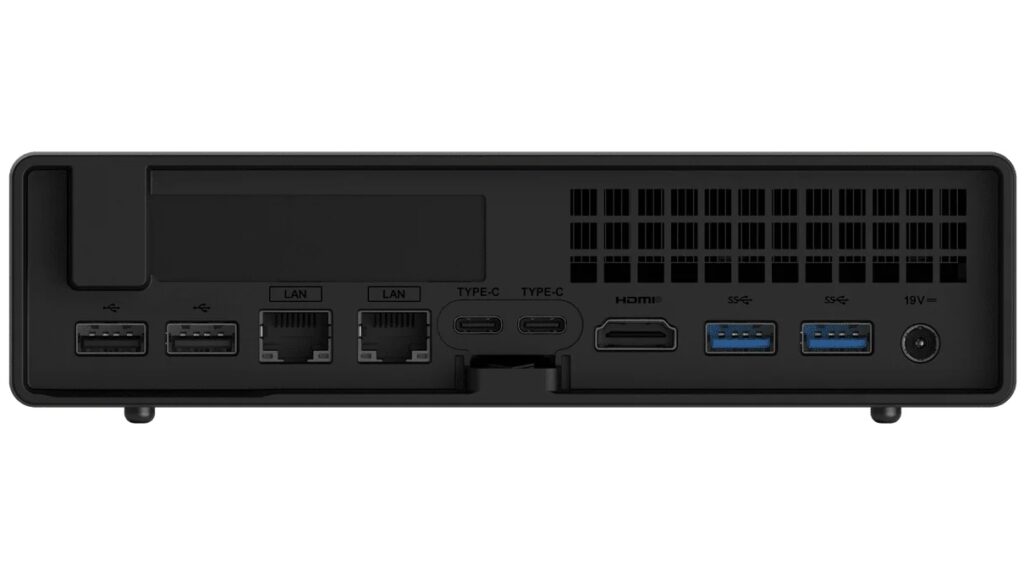
Networking is its other standout feature. The MS-R1 includes two 10GbE ports. That’s something that usually shows up in small servers or pricey workstation boards. For home lab enthusiasts, that makes this box immediately useful. You can run it as a router, NAS controller, lab node, build runner, or edge AI appliance. It also has Wi-Fi 6E if cables aren’t convenient, but the wired networking is clearly the main event.
What caught my eye, though, is the PCIe slot. Minisforum included a full-size x16 slot (wired for x8) inside this tiny machine. That means GPUs, NICs, storage cards, or even U.2 adapters are theoretically on the table. ARM desktops rarely get this kind of option. It basically lets you treat the MS-R1 like a small server board rather than a sealed black box. For Linux users who have been wanting to experiment with ARM while still having access to practical expansion hardware, this might be the first device that actually fits.
Cooling seems thoughtfully handled too. With a 28W TDP and a compact cooling chamber, noise should stay around 35dB. That’s not fanless quiet, but it’s better than some small PCs that sound like leaf blowers when under load. So yes, it’s small, but it doesn’t appear to be compromising on performance just for the sake of aesthetics.
The idea here isn’t that ARM is suddenly replacing x86 on the desktop. Instead, it feels like Minisforum is positioning the MS-R1 as a testbed for what an ARM workstation could be once software support becomes more universal. Debian 12 is officially supported, and although drivers for mainline Linux are still in progress, the company appears to be approaching support in a relatively normal and transparent way. If ARM on the desktop becomes a long-term shift, devices like this may end up being the “early normal” rather than the Raspberry Pi-style experiment.
The Minisforum MS-R1 can be ordered here starting around $503.90 for the 32GB model and goes up depending on RAM and SSD configuration. You can add your own storage if you prefer to save a little money. Pricing lands in the same neighborhood as many x86 mini PCs, which makes this a real decision rather than a novelty. If you’re curious about ARM as a workstation platform and you like the idea of dual 10GbE and a real PCIe slot, it may be worth a look.
Support independent tech journalism
NERDS.xyz is independently owned and operated. If you enjoy my coverage of Linux, AI, hardware, cybersecurity, and tech culture, consider supporting the site on Ko-fi.
Support NERDS.xyz