Multi-monitor docks often come with compromises. Some require proprietary software, others carry a Thunderbolt-sized price tag, and many make buyers study compatibility charts before connecting a single cable. Plugable thinks it has a simpler answer for Windows and ChromeOS users.
I have long been a fan of Plugable products. The company generally delivers great quality at affordable prices, which is exactly what many people want from a dock or adapter. Its new UD-MSTH3 appears to follow that same formula.
The 14-port USB-C docking station can power as many as three extended displays without drivers. It uses Multi-Stream Transport, better known as MST, to handle the extra screens through technology already supported by Windows and ChromeOS.
That means users should not have to install DisplayLink software or keep another background utility updated. Connect a compatible laptop, plug in the monitors, and the operating system handles the rest.
“For most docks in this space, manufacturers rely on drivers and software, or expensive Thunderbolt solutions to achieve a solid triple display experience,” said Lynn Smurthwaite-Murphy, CEO of Plugable. “With the UD-MSTH3, we wanted plug-and-play simplicity for Windows and ChromeOS users without the higher price tag. This dock gives users the flexibility to create a workstation that meets their individual display and performance needs.”
The dock includes three HDMI 2.0 ports, but buyers should pay close attention to the supported resolution combinations. When two displays are connected, the UD-MSTH3 can run both at 4K resolution and 60Hz. That is the most appealing configuration for users who want sharp text and smooth movement across a pair of large monitors.
Using all three HDMI ports changes the equation. The standard triple-display configuration supports one monitor at 4K 60Hz and two additional monitors at 1080p 60Hz. That is still plenty of desktop space, but it is not triple 4K.
Certain computers that support Display Stream Compression may manage two 4K 60Hz displays alongside a third 4K screen at 30Hz. Plugable correctly avoids promising that setup for every machine, however. Results depend on the laptop, graphics hardware, compression support, connected displays, and available video bandwidth.
For the best results, Plugable recommends a laptop with an Intel 12th-generation processor or an AMD Ryzen 6000-series processor or newer. The UD-MSTH3 works with full-featured USB-C, USB4, Thunderbolt 4, and Thunderbolt 5 ports, although a compatible connector alone does not guarantee every advertised display configuration.
Mac owners face the biggest limitation. macOS does not support MST for multiple extended displays, so the UD-MSTH3 cannot deliver its main triple-screen feature on Apple computers.
A Mac can connect to the dock, but only one external display will operate as an extended desktop. Additional monitors will mirror the same content. Anyone shopping specifically for a multi-monitor Mac dock should instead consider a Thunderbolt or DisplayLink-based model.
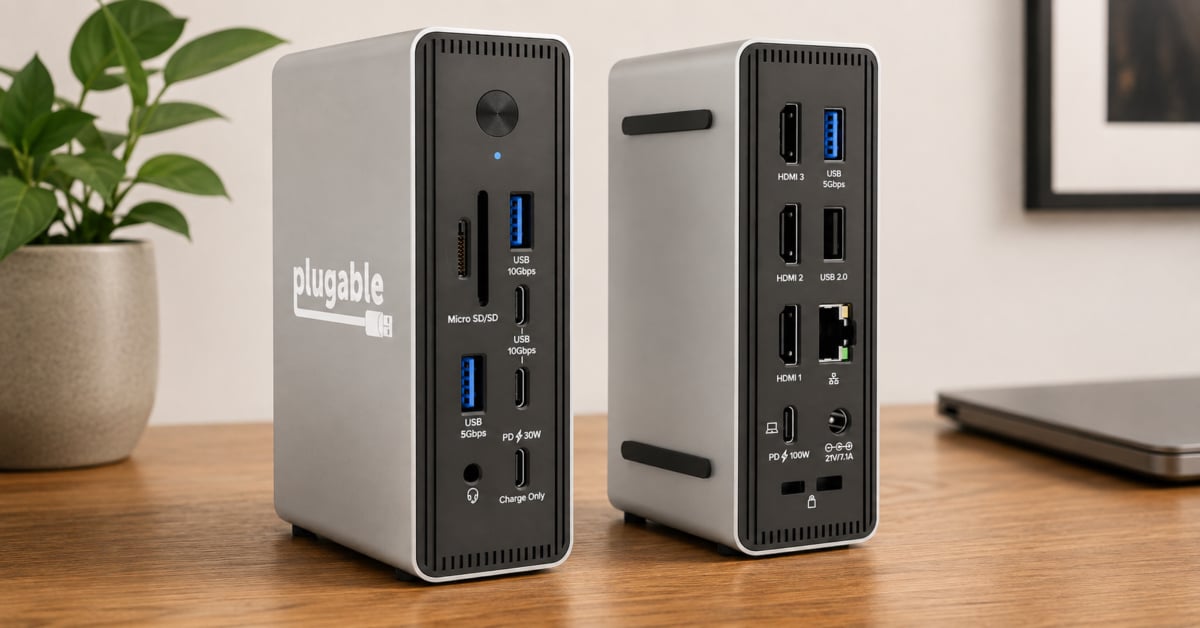
For Windows and ChromeOS users, the rest of the port selection is fairly generous. The dock delivers up to 100W of USB-C Power Delivery to the connected laptop, which should be sufficient for many business notebooks and productivity-focused machines.
There is also a separate front-facing USB-C port capable of delivering up to 30W for charging a phone, tablet, or another device. Since this is a charge-only connection, users should not expect data transfer or video output from it.
Two additional front USB-C ports support transfer speeds up to 10Gbps. The front panel also includes a 10Gbps USB-A port, SD and microSD card readers, and a 3.5mm audio connection. This arrangement should reduce the need to reach behind the dock when connecting storage devices, memory cards, headphones, or other frequently used accessories.
On the rear are two 5Gbps USB-A ports, one USB 2.0 port, the three HDMI connections, Ethernet, the host USB-C connection, and the power input. The slower USB 2.0 port makes sense for a keyboard, mouse, printer, or another peripheral that does not need much bandwidth.
Wired networking tops out at 2.5Gbps, a useful improvement over the Gigabit Ethernet found on many less expensive docks. Of course, users will need compatible network hardware and a sufficiently fast internet or local network connection to see the benefit.
Plugable includes a 150W power supply, so laptop charging and connected accessories do not depend entirely on the computer’s USB-C port. The dock can stand vertically or rest horizontally, giving users some flexibility on crowded desks. K-lock security slots are included as well.
The Plugable UD-MSTH3 is available from Amazon for $149.99. However, a 30 percent launch discount temporarily lowers the price to $104.99!
At that discounted price, the UD-MSTH3 looks like a practical option for Windows and ChromeOS users who genuinely need three monitors. Plugable has earned a reputation with me for combining solid build quality with reasonable pricing, and this dock seems to fit that pattern. Buyers should still verify their laptop’s display capabilities before ordering, though. The dock may be driver-free, but multi-monitor USB-C compatibility is never completely free of fine print.
As an Amazon Associate I earn from qualifying purchases. Some links in this article may be affiliate links. If you click one and make a purchase, I may receive a small commission at no extra cost to you. This helps support NERDS.xyz.
Support independent tech journalism
NERDS.xyz is independently owned and operated. If you enjoy my coverage of Linux, AI, hardware, cybersecurity, and tech culture, consider supporting the site on Ko-fi.
Support NERDS.xyz